
Getting Started
Step 1. Preparing the Workbook The Web Service API needs Inputs and Outputs of your calculation engine; to be defined as Named Ranges in Excel. Therefore,…
Step 1. Preparing the Workbook
The Web Service API needs Inputs and Outputs of your calculation engine; to be defined as Named Ranges in Excel. Therefore, the first step is to define these in the Excel workbook. This can be done in the Defined Names section of the Formulas tab on the Excel ribbon shown below. 
We are using I_EffectiveDate, which refers to IO!B2 and InputList, which refers to IO!B3:B5 for inputs. We are using Plan1_Single, Plan1_Couple, Plan1_Parent, Plan1_Family for outputs, which refer to cells IO!B10:B13.
You can download this test file from RatingEngine.xlsx.
Step 2. Creating a Web Service
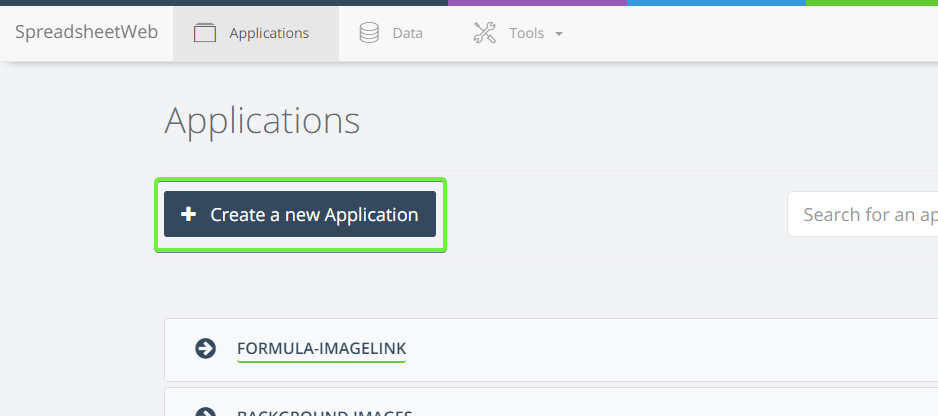
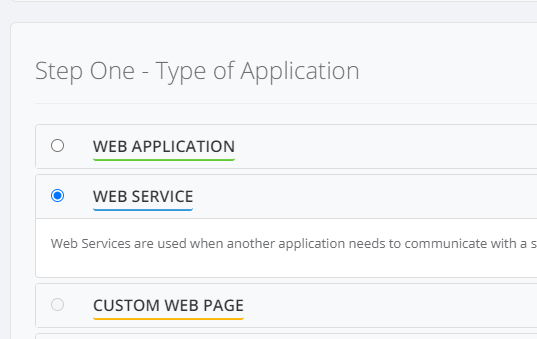
Once your workbook is ready to publish, login to SpreadsheetWEB Control Panel and click Create New Application. Select Web Service from the list of application types.
Create New Application button.
Choose Web Service Application.
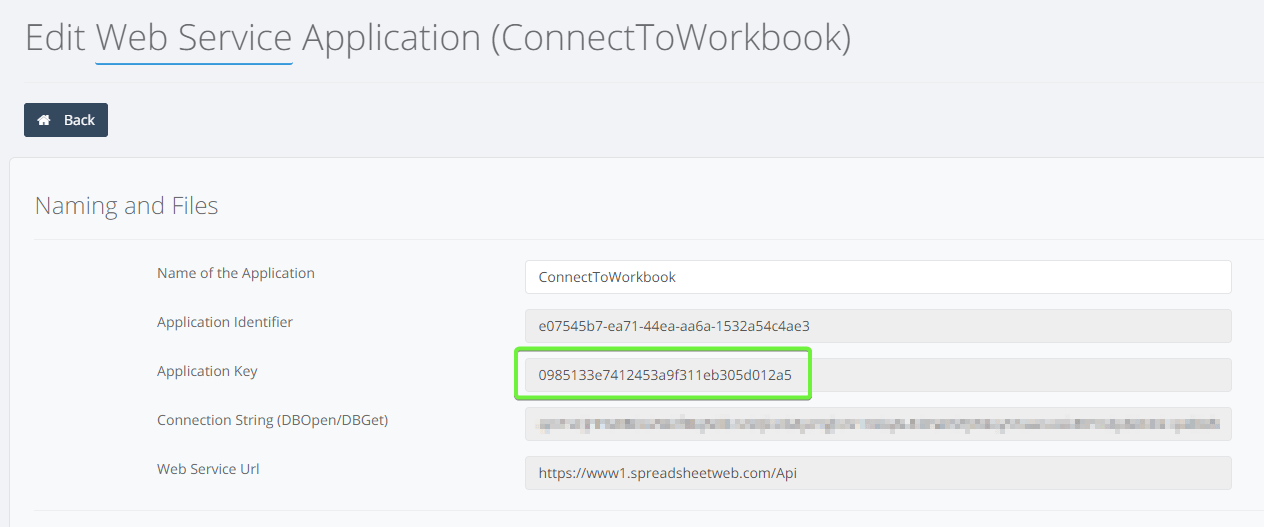
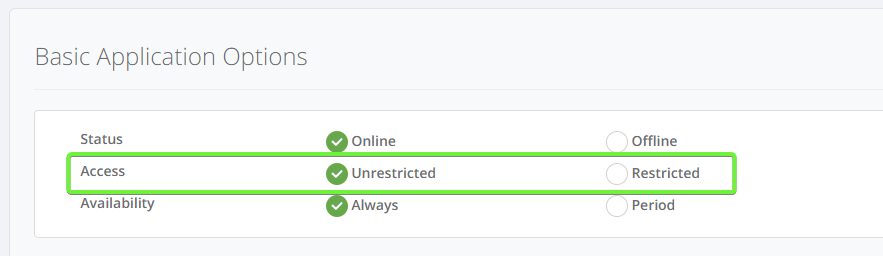
Application keys are assigned to your web service and will be shown in the Edit Application screen and on the completion screen through the wizard. You will use this key to connect to your application. If you would like to make this application publicly available, Access should be selected as “Unrestricted”, as shown below.
_Application key visible on the edit application screen.
_
_Unrestricted access found under Basic Application Options under Edit Application screen.
_
The sample code uses "YOUR_APPLICATION_KEY" as the application key.
Step 3. Security
If access is “Restricted”, then it will be a private application, requiring API Key and API Password for authorization. These parameters are set individually for each site. If already configured at the site-level, you can obtain these keys under the Edit Application screen for the target application. If not set up under the sites section and you do not have access to the System Administration section of the Control Panel, then please contact your System Admin.
For restricted web services, the site-level client identifier and secret are visible under the edit applications screen. Learn more at Whitelisting.
You will also need the API Service URL and Authentication Service URL for the corresponding server. Please contact your system administrator for this information.
Our sample code uses "YOUR_CLIENT_IDENTIFIER" as the Client Identifier and "YOUR_CLIENT_SECRET" as the Client Secret.
Step 4. Add API Library to Project
We offer API Connector libraries that authenticate through an OAuth authentication provider to retrieve a session key and send API request to our API service in order to retrieve a response. These libraries are available in C#, Java, JavaScript, and PHP. You can download these libraries from the API Libraries section.
You will need to add one of these libraries to your project as a first step, depending on your project development platform.
Sample Code
Connecting a Public Application
.NET
var client = new Pagos.SpreadsheetWeb.SpreadsheetWebAPI(string.Empty, string.Empty, false) { APIServiceURL = ";http://dev7.pagos.com/Api/JSONService";, OAuthServiceURL = ";http://dev7.pagos.com/Auth/OAuthIssuer"; };
// Create your new request data transfer object. var request = new CalculationRequest { ApplicationKey = "YOUR_APPLICATION_KEY", Save = false, Inputs = new Dictionary;>; { {"I_EffectiveDate", new List; {"01-20-2015"}}, {"I_Zip", new List; {"90000"}}, {"I_SIC", new List; {"3550"}}, {"I_Eligible", new List; {"50"}} }, Outputs = new List; { "Plan1_Single", "Plan1_Couple", "Plan1_Parent", "Plan1_Family" } };
// Call the server to run your calculation request. var result = client.GetResult(request);
// If successful, using the Newtonsoft JSON library to deserialize the results. if (result.IsSuccessful()) { var outputRanges = Newtonsoft.Json.JsonConvert.DeserializeObject;( Newtonsoft.Json.JsonConvert.DeserializeObject;(result.Results)); }
JAVA
SpreadsheetWebAPI api = new SpreadsheetWebAPI(false); api.APIServiceURL = ";http://dev7.pagos.com/Api/JSONService";; api.OAuthServiceURL = ";http://dev7.pagos.com/Auth/OAuthIssuer";; Map;>; inputList = new HashMap;>;();
// Mapping a single input (to a single cell in the spreadsheet). ArrayList; effectiveDate = new ArrayList;(); effectiveDate.add("1/1/2012"); inputList.put("I_EffectiveDate", effectiveDate);
// Mapping to a ranged input (a named range that constitutes multiple cells in the spreadsheet). ArrayList; rangeInput = new ArrayList;(); rangeInput.add("90000"); rangeInput.add("3550"); rangeInput.add("65"); inputList.put("InputList", rangeInput);
// Requested outputs. ArrayList; outputList = new ArrayList;(); outputList.add("Plan1_Single"); outputList.add("Plan1_Couple"); outputList.add("Plan1_Parent"); outputList.add("Plan1_Family");
SpreadsheetWebResults results = api.GetResult("YOUR_APPLICATION_KEY", // Application Key "", // Requested record ID "ssweb", // User Name false, // Whether or not to save the record "", // Session ID inputList, // Map of inputs outputList); // List of requested outputs
System.out.println("Is Successful:" + results.isSuccessful().toString()); System.out.println("Status Code:" + results.getHttpStatusCode().toString()); System.out.println("JSON Results:" + results.getResults());
PHP
$api = new SswebAPI(false); $api->;OAuthServiceURL = ";http://dev7.pagos.com/Auth/OAuthIssuer";; $api->;APIServiceURL = ";http://dev7.pagos.com/Api/JSONService";;
$ApplicationKey = 'YOUR_APPLICATION_KEY'; $RecordId = null; $UserName = "ssweb"; $SessionId = ''; $Save = false; $Inputs = array("I_EffectiveDate"=>;array("01-20-2015"),"I_Zip"=>;array("90000"), "I_SIC" =>; array("3550"), "I_Eligible" =>;array("50")); $Outputs = array("Plan1_Single", "Plan1_Couple", "Plan1_Parent", "Plan1_Family");
echo $result = $api->;GetResult($ApplicationKey, $RecordId, $UserName, $SessionId, $Save, $Inputs, $Outputs);
JavaScript
/* Set up the API endpoints. */ APIServiceURL = ";http://dev7.pagos.com/Api/JSONService";; OAuthServiceURL = ";http://dev7.pagos.com/Auth/OAuthIssuer";;
/* Set up the application key. */ var applicationKey = "YOUR_APPLICATION_KEY";
/* Set up the requested inputs. */ var inputs = { I_Name: ["ssweb"], I_EffectiveDate: ["01/01/2012"], I_Zip: ["10001"], I_SIC: ["0123"], I_Eligible: ["3"] };
/* Set up the requested outputs. */ var outputs = [ "Plan1_Single", "Plan1_Couple", "Plan1_Parent", "Plan1_Family" ];
/* Fire the request. Use the callback to handle the response. */ GetResult( applicationKey, "ssweb", false, inputs, outputs, -1, null, function (response) { /* Deserialize the response. */ var deserializedResponse = JSON.parse(response);
/* For each output range, write the name of the requested * range, along with the value array. */ $.each(deserializedResponse.OutputRanges, function(index, value){ var valueContents = ""; $.each(value.Value, function(i, v){ valueContents += v + ", "; }); console.log(value.Name + " = " + valueContents) }) });
Connecting a Private Application
.NET
var client = new Pagos.SpreadsheetWeb.SpreadsheetWebAPI( "YOUR_CLIENT_IDENTIFIER", "YOUR_CLIENT_SECRET", false) { APIServiceURL = ";http://dev7.pagos.com/Api/JSONService";, OAuthServiceURL = ";http://dev7.pagos.com/Auth/OAuthIssuer"; }; // Create your new request data transfer object. var request = new CalculationRequest { ApplicationKey = "YOUR_APPLICATION_KEY", Save = false, Inputs = new Dictionary;>; { {"I_EffectiveDate", new List; {"01-20-2015"}}, {"I_Zip", new List; {"90000"}}, {"I_SIC", new List; {"3550"}}, {"I_Eligible", new List; {"50"}} }, Outputs = new List; { "Plan1_Single", "Plan1_Couple", "Plan1_Parent", "Plan1_Family" } }; // Call the server to run your calculation request. var result = client.GetResult(request); // If successful, using the Newtonsoft JSON library to deserialize the results. if (result.IsSuccessful()) { var outputRanges = Newtonsoft.Json.JsonConvert.DeserializeObject;( Newtonsoft.Json.JsonConvert.DeserializeObject;(result.Results)); }
JAVA
SpreadsheetWebAPI api = new SpreadsheetWebAPI("YOUR_CLIENT_IDENTIFIER", "YOUR_CLIENT_SECRET", false); api.APIServiceURL = ";http://dev7.pagos.com/Api/JSONService";; api.OAuthServiceURL = ";http://dev7.pagos.com/Auth/OAuthIssuer";; Map;>; inputList = new HashMap;>;(); // Mapping a single input (to a single cell in the spreadsheet). ArrayList; effectiveDate = new ArrayList;(); effectiveDate.add("1/1/2012"); inputList.put("I_EffectiveDate", effectiveDate); // Mapping to a ranged input (a named range that constitutes multiple cells in the spreadsheet). ArrayList; rangeInput = new ArrayList;(); rangeInput.add("90000"); rangeInput.add("3550"); rangeInput.add("65"); inputList.put("InputList", rangeInput); // Requested outputs. ArrayList; outputList = new ArrayList;(); outputList.add("Plan1_Single"); outputList.add("Plan1_Couple"); outputList.add("Plan1_Parent"); outputList.add("Plan1_Family"); SpreadsheetWebResults results = api.GetResult("YOUR_APPLICATION_KEY", // Application Key "", // Requested record ID "ssweb", // User Name false, // Whether or not to save the record "", // Session ID inputList, // Map of inputs outputList); // List of requested outputs System.out.println("Is Successful:" + results.isSuccessful().toString()); System.out.println("Status Code:" + results.getHttpStatusCode().toString()); System.out.println("JSON Results:" + results.getResults());
PHP
$api = new SswebAPI("YOUR_CLIENT_IDENTIFIER", "YOUR_CLIENT_SECRET", true); $api->;OAuthServiceURL = ";http://dev7.pagos.com/Auth/OAuthIssuer";; $api->;APIServiceURL = ";http://dev7.pagos.com/Api/JSONService";;
$ApplicationKey = 'YOUR_APPLICATION_KEY'; $RecordId = null; $UserName = "ssweb"; $SessionId = ''; $Save = false; $Inputs = array("I_EffectiveDate"=>;array("01-20-2015"),"I_Zip"=>;array("90000"), "I_SIC" =>; array("3550"), "I_Eligible" =>;array("50")); $Outputs = array("Plan1_Single", "Plan1_Couple", "Plan1_Parent", "Plan1_Family");
echo $result = $api->;GetResult($ApplicationKey, $RecordId, $UserName, $SessionId, $Save, $Inputs, $Outputs);
JavaScript
/* Set up the API endpoints. */ APIServiceURL = ";http://dev7.pagos.com/Api/JSONService";; OAuthServiceURL = ";http://dev7.pagos.com/Auth/OAuthIssuer";;
/* Set up the security keys. */ ClientIdentifier = "YOUR_CLIENT_IDENTIFIER"; ClientSecret = "YOUR_CLIENT_SECRET";
/* Set up the application key. */ var applicationKey = "YOUR_APPLICATION_KEY";
/* Set up the requested inputs. */ var inputs = { I_Name: ["ssweb"], I_EffectiveDate: ["01/01/2012"], I_Zip: ["10001"], I_SIC: ["0123"], I_Eligible: ["3"] };
/* Set up the requested outputs. */ var outputs = [ "Plan1_Single", "Plan1_Couple", "Plan1_Parent", "Plan1_Family" ];
/* Fire the request. Use the callback to handle the response. */ GetResult( applicationKey, "ssweb", false, inputs, outputs, -1, null, function (response) { /* Deserialize the response. */ var deserializedResponse = JSON.parse(response);
/* For each output range, write the name of the requested * range, along with the value array. */ $.each(deserializedResponse.OutputRanges, function(index, value){ var valueContents = ""; $.each(value.Value, function(i, v){ valueContents += v + ", "; }); console.log(value.Name + " = " + valueContents) }) });